
Sonoff NSpanel – first impressions!
Sonoff just introduced the NSpanel, a brand new 2-gang smart (Wifi) wall switch combined with a 3.5″ HMI touchscreen with a resolution of 480×320 pixels. There are 2 versions available, one for the US market, and one for the EU. Sonoff was kind enough to send us the EU version for review. Thank you Sonoff!


Hardware
The heart of the Sonoff NSpanel is a ESP32-DOWD V3 with 4MB of flash memory. That’s great news! Some time ago Sonoff released the Sonoff Dual R3, which runs the same MCU.
Chip is ESP32-D0WD-V3 (revision 3)
Features: WiFi, BT, Dual Core, 240MHz, VRef calibration in efuse, Coding Scheme None
Crystal is 40MHz
MAC: 94:3c:c6:c7:8a:24
Uploading stub...
Running stub...
Stub running...
Manufacturer: ef
Device: 4016
Detected flash size: 4MB
It supports Wifi and Bluetooth and Sonoff is again using the Bluetooth feature wisely, as they support BT-paring, which works great on the eWeLink app.
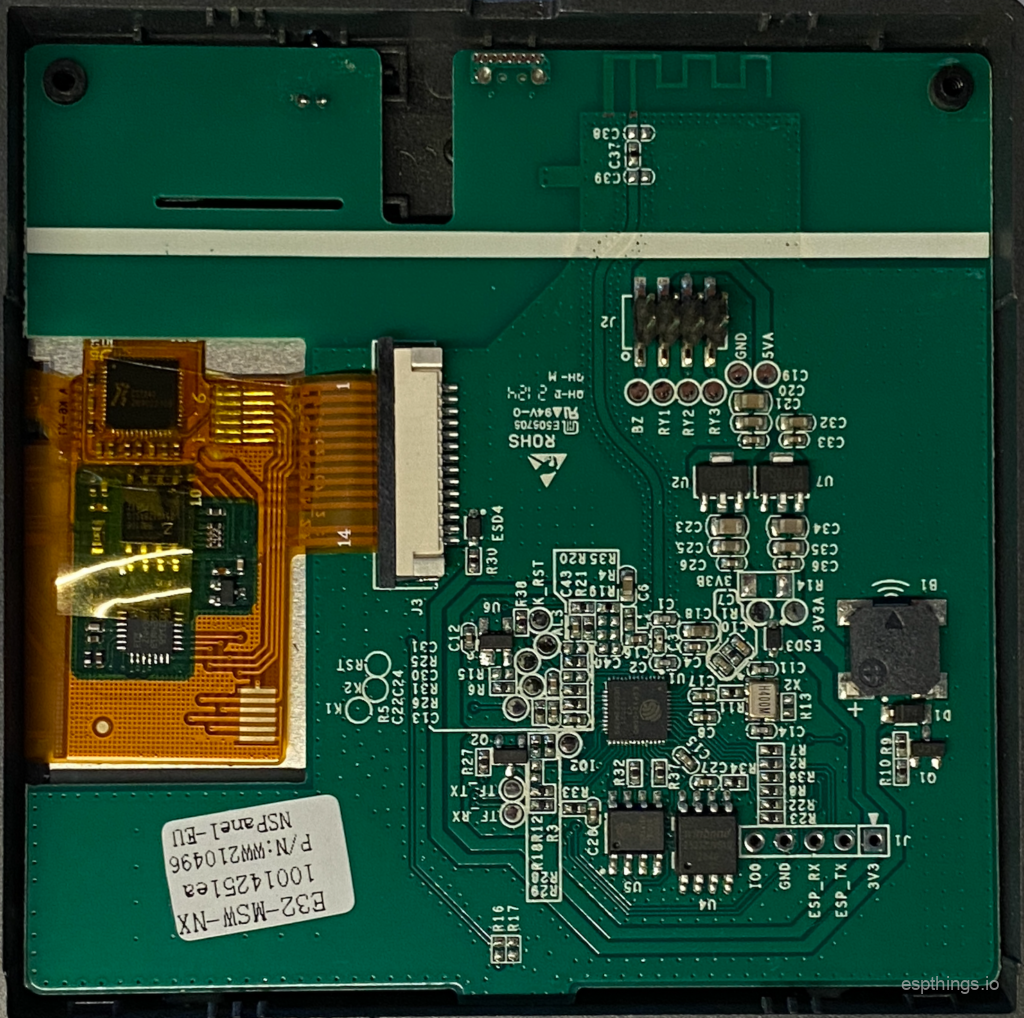
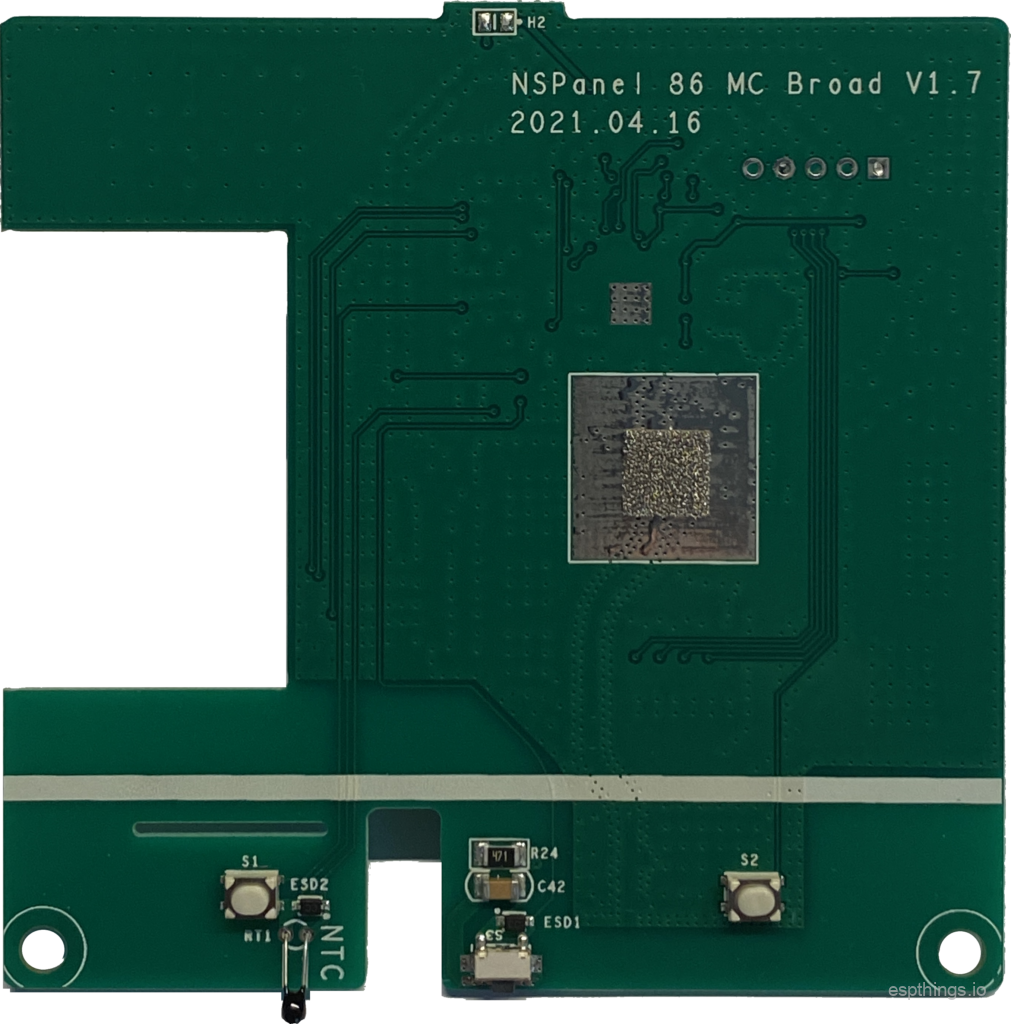
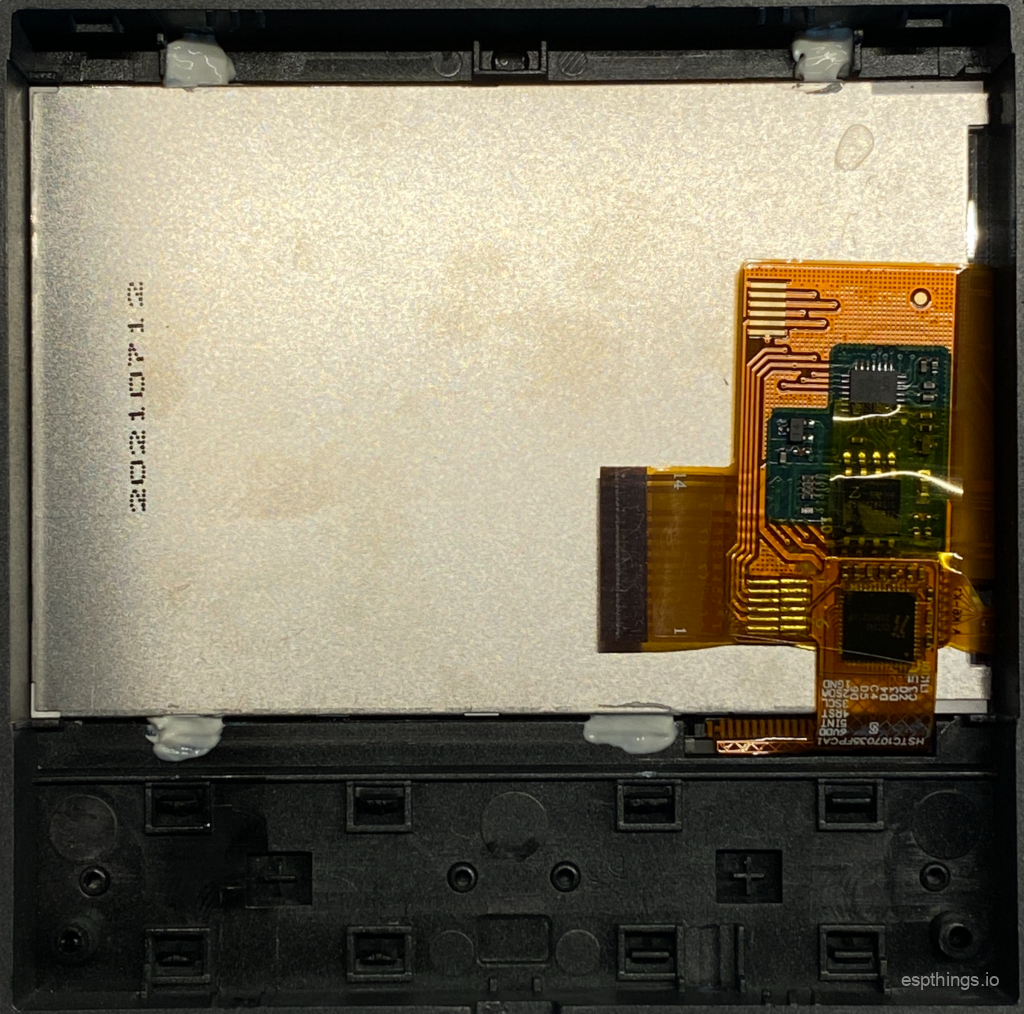
The Sonoff NSpanel has 2 physical switches that can switch 2 relays that support inching mode and interlock. According to the specifications the relays can handle 150W at 110V per Gang or 300W at 220V per Gang. The Relays used are rated 10A, so there is quit some headroom. The display is a 3,5″ 480*320px HMI touchscreen with a Toughened Glass plate. When we took the NSpanel apart, we noticed the STM32G031G8 32-bit Cortex® ARM MCU which leads us to believe there is an actual Nextion HMI Display inside, so it should be possible to have full esphome support for the NSpanel which would make it really useful for use with Home Assistant. The screen looks great, even at oblique viewing angles. Touch responds reliably and reasonably fast. Furthermore the Sonoff NSpanel features a NTC temperature sensor, and a reset button.

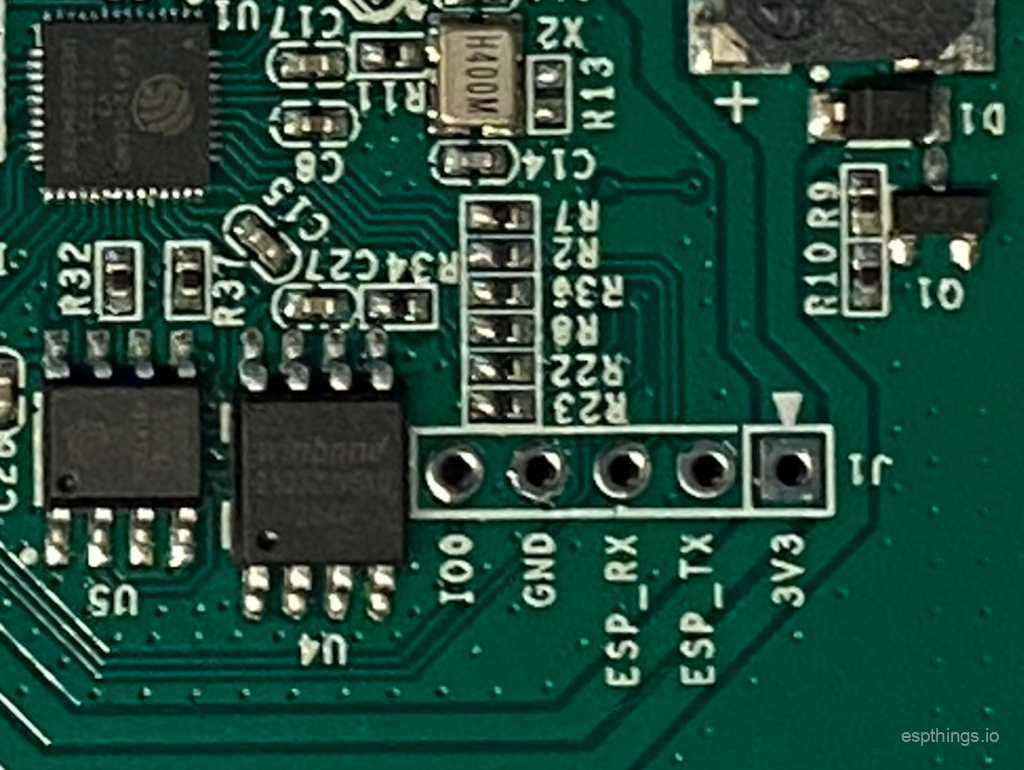
The quality of the panel seems to be quit decent. It’s frame is injection moulded plastic, and the “Toughened” glass front looks nice. The internal hardware is nicely screwed together. With exception of the display there is no glued parts and everything fits well. We like the fact that there is a header for 3.3v, TX, RX, GND and GPIO0 (no pins), which makes it easy to flash esphome on it. We have already backed up the original firmware and started the first experiments 🙂
esptool % esptool.py --chip esp32 --port /dev/tty.usbserial-0001 --baud 115200 read_flash 0x000 4194304 nspanel_backup.bin
esptool.py v3.0
Serial port /dev/tty.usbserial-0001
Connecting.......
Chip is ESP32-D0WD-V3 (revision 3)
Features: WiFi, BT, Dual Core, 240MHz, VRef calibration in efuse, Coding Scheme None
Crystal is 40MHz
MAC: 94:3c:c6:c7:8a:24
Uploading stub...
Running stub...
Stub running...
323584 (7 %)
Another thing we noticed is that the NSpanel seems to feature a separate antenna for Wifi and Bluetooth. The Wifi reception is good.
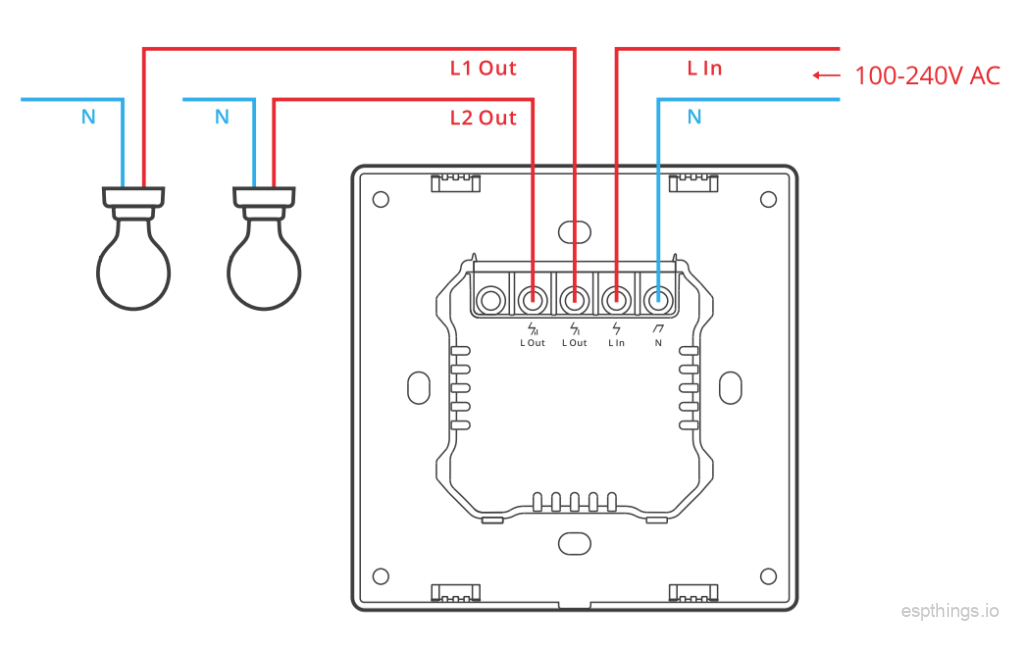
Wiring
The wiring of the NSpanel is the same as many other 2-gang switches
Software
We have initially tested the Sonoff NSpanel using the original firmware and the eWeLink app. The pairing proces, using Bluetooth was a breeze. You’ll have this thing paired in no-time. The support for widgets still seems to be missing. We can’t be sure as we have no further Sonoff Hardware running original (eWeLink based) firmware. We will not focus much on the eWelink software as us “nerds” won’t go for anything less then esphome, Tasmota or HA SwitchPlate HASPone on our NSpanel anyway. 😉
ESPhome
Finding out all GPIO’s without destroying our sample tuned out to be a little tricky. For now we have the relays and buttons working using ESPhome. We did not manage to get the display working yet. We are reanonably sure GPIO 16 and 17 are used for TX/RX and since the original Sonoff firmware uses 921600bps for USART-updates, we are also quit sure the Baud Rate is correct. Nevertheless we keep getting “[W][nextion:072]: Nextion is not connected!” in the logs.
If anyone has more information on how to get the NTC temperature sensor and the Nextion display working, please post it in the comments below, or use the contact form.
Our preliminary config, now also includes the NTC and buzzer:
substitutions:
  devicename: sonoff-nspanel
  long_devicename: Sonoff NSpanel

esphome:
  name: $devicename
  platform: ESP32
  board: esp32dev
  comment: $long_devicename

wifi:
  ssid: !secret esphome_wifi_ssid
  password: !secret esphome_wifi_password
  power_save_mode: light
  ap:
    ssid: $devicename
    password: !secret esphome_ap_password

captive_portal:

api:
  password: !secret esphome_api_password
  services:
    - service: update_nextion
      then:
        - lambda: 'id(display1)->upload_tft();'

ota:
  password: !secret esphome_ota_password

web_server:
  port: 80

logger:
  baud_rate: 0
  level: VERBOSE

uart:
  id: uart_1
  tx_pin: GPIO16
  rx_pin: GPIO17
  baud_rate: 921600

display:
  - platform: nextion
    id: display1
    uart_id: uart_1
    tft_url: https://!secret homeasssistant_url/local/nextion/display.tft
    brightness: 25%
    lambda: |-
      it.set_component_value("gauge", 50);
      it.set_component_text("textview", "Hello World!");

# remove # below to enable ble tracking
#esp32_ble_tracker:

sensor:
  - platform: wifi_signal
    name: "$long_devicename - WiFi Signal"
    update_interval: 60s
  - platform: adc
    id: ntc_sensor
    pin: 38
    attenuation: 11db
    update_interval: 5s
  - platform: ntc
    sensor: resistance_sensor
    calibration:
      b_constant: 3950
      reference_temperature: 22°C
      reference_resistance: 10kOhm
    name: "$long_devicename - NTC Temperature"
  - platform: resistance
    id: resistance_sensor
    sensor: ntc_sensor
    configuration: DOWNSTREAM
    resistor: 10kOhm
    reference_voltage: 3.6V
    name: "$long_devicename - NTC Resistance"

rtttl:
  output: rtttl_out

output:
  - platform: gpio
    pin: GPIO19
    id: relay1
  - platform: gpio
    pin: GPIO22
    id: relay2
  - platform: gpio
    pin: GPIO4
    id: displ
  - platform: ledc
    pin: GPIO21
    id: rtttl_out

switch:
  - platform: output
    name: "$long_devicename - relay 1"
    output: relay1
    id: sw1
  - platform: output
    name: "$long_devicename - relay 2"
    output: relay2
    id: sw2
  - platform: output
    name: "$long_devicename - display"
    output: displ
  - platform: template
    name: "$long_devicename - buzzer"
    turn_on_action:
      then:
        - rtttl.play: "test:d=4,o=5,b=100:16e6,16e6,32p,8e6,16c6,8e6,8g6,8p,8g,8p"

binary_sensor:
  - platform: gpio
    pin:
      number: GPIO14
      mode: INPUT_PULLUP
      inverted: True
    name: "$long_devicename switch 1"
    on_press:
      - logger.log: "$long_devicename switch 1"
      - switch.toggle: sw1

  - platform: gpio
    pin:
      number: GPIO27
      mode: INPUT_PULLUP
      inverted: True
    name: "$long_devicename switch 2"
    on_press:
      - logger.log: "$long_devicename switch 2"
      - switch.toggle: sw2
More soon…
For now we have posted some pictures below. A full review will be published shortly.
Please let us know in the comments if this article was helpful to you in any way 🙂
Please also subscribe to our YouTube channel and hit the notification bel. We are not very active on Youtube yet, but we will be in the future. It’s the best way to support us and you won’t miss any of our upcoming video’s!



Please subscribe to our newsletter!
Nice, looking forward to more information
Great – really looking forward to seeing photos of ESPHome running on the nextion display once you have this figured out 🙂
Sonoff has just published some technical info about NSPanel: https://www.kickstarter.com/projects/sonoffnspanel/sonoff-nspanel-smart-scene-wall-switch/posts/3328417
Thanks! At first glance it looks like we did everything correctly then, but we’ll have another close look 🙂
Sonoff posted an update with technical info. Pinouts, protocol, etc.
https://www.kickstarter.com/projects/sonoffnspanel/sonoff-nspanel-smart-scene-wall-switch/posts/3328417
Yup, we are looking into it.
Nice! This is what i’ve been waiting for since 2018 when i build my new house 😀 I have no wall switches yet, been using HomeKit for 3 years now 😛 My wife will be happy now. 20 of those please.
Yes, I agree. If esphome or tasmota will support them in full, it will be quit a nice addition to manny of our houses 🙂
921600bps seems like a really odd baud rate, and isn’t mentioned here: https://nextion.tech/2017/12/08/nextion-hmi-upload-protocol-v1-1/
Looks like Blakadder was able to communicate with the panel: https://blakadder.com/nspanel-teardown/
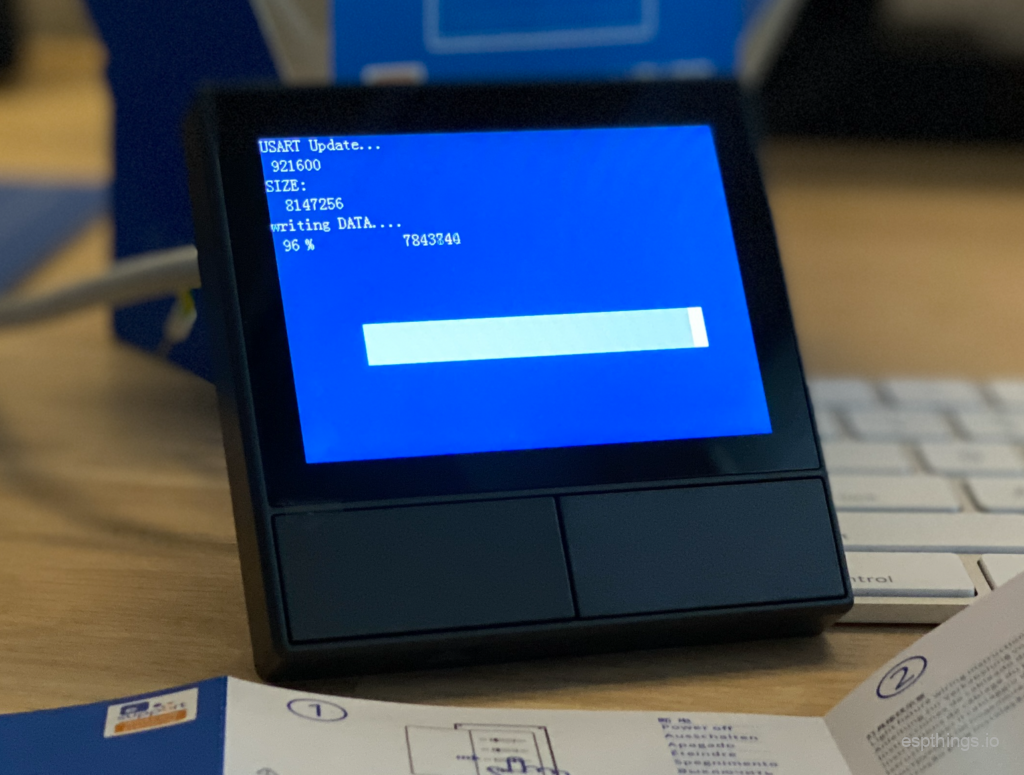
Well, as you can see in the pictures the .tft (USART update) of the Nextion in the NSpanel is flashed at 921600. Since I tried all the obvious speeds (9600, 115200) I decided to test 921600 as well and left it at that. Non of those work. It seems like to esphome Nextion module needs a change for this specific Nextion panel to work.
Hey there,
Any news on this since ?
These would be pretty much perfect if they could interface with home assistant, I’d get one for each room immediately.
Yes, many of us are getting these going nicely on Home Assistant and are sharing approaches – see:
https://community.home-assistant.io/t/sonoff-nspanel-smart-scene-wall-switch-by-itead-coming-soon-on-kickstarter/332962/7
https://community.home-assistant.io/t/nextion-handler-for-home-assistant-for-nspanels/394858/2
https://www.youtube.com/watch?v=Kdf6W_Ied4o
i think combining this story with the video will get us somewhere.
Starting soon with my first 2
[…] 10 months ago Sonoff send us the NSpanel and thereafter we published our first impressions. The product was not entirely new and innovative, as there where Nextion Touch displays and 2-gang […]